Navigation
- Kanamaru Lab., Kogakuin Univ.
Smartphones and single board computers- Control theory
- Education support system
- Voice recognition and voice synthesis
- Visual programming
- Web technology and circuits
- Firefox OS and web technology
- Smartwatch for control
- Control via Bluetooth with android
- Image processing with android
- USB devices with android
- android with ADK
- ICS on NetWalker
- Gingerbread on NetWalker
- Froyo on NetWalker
- Froyo on BeagleBoard
Image Processing System
Reinforcement Learning for Biped Robots
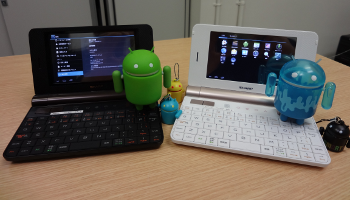
In this page, we summarize how to install android 4.0.3 (ICS: Icecream Sandwich) into Sharp NetWalker (PC-Z1).
Our method is based on Android on NetWalker (by androidzaurus)
To build gingerbread, please note that JDK1.6 and 64bit OS are required.
History
2012.1.6: Open to the public
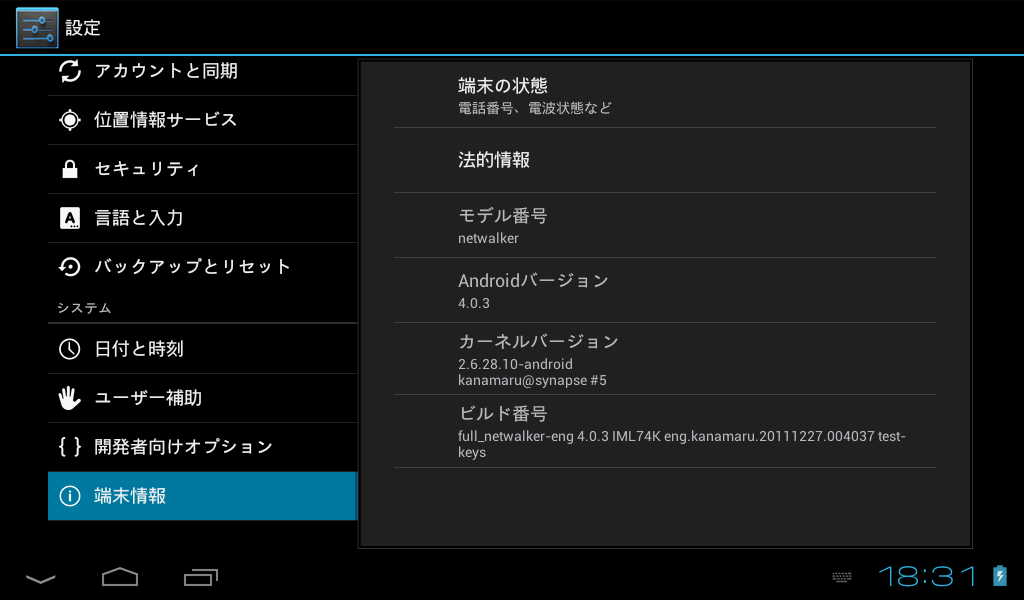
To build the android from the sources, please see Section 1.
If you want to try it as soon as possible, please see Section 7.
1. Downloading android sources
To download the sources, please use another x64-based PC.First please determine the destination directory, and the set a environment variable ANDROID_ROOT to it, e.g.,
$ export ANDROID_ROOT=/home/kanamaru/ics-netwalkerThen, please download the sources.
$ mkdir -p $ANDROID_ROOT
$ cd $ANDROID_ROOT
$ repo init -u https://android.googlesource.com/platform/manifest -b android-4.0.3_r1.1
$ repo sync -j8
2. Downloading kernel
$ cd $ANDROID_ROOT
$ wget http://netbook-remix.archive.canonical.com/updates/pool/public/l/linux-fsl-imx51/linux-fsl-imx51_2.6.28-15.50fsl1araneo19.tar.gz
$ tar zxf linux-fsl-imx51_2.6.28-15.50fsl1araneo19.tar.gz
3. Downloading and applying the patches by androidzaurus
First, download the patches from androidzaurus / droidwalker.By clicking "Downloads" , "Download.tar.gz", download "androidzaurus-droidwalker-61b2290.tar.gz" to $ANDROID_ROOT directory.
$ cd $ANDROID_ROOT
$ tar zxf androidzaurus-droidwalker-61b2290.tar.gz
$ cd jaunty-arm
$ patch -p1 < ../androidzaurus-droidwalker-61b2290/diff-araneo-android-2.6.28.patch
$ patch -p1 < ../androidzaurus-droidwalker-61b2290/disable_double_buffering.patch
$ patch -p1 < ../androidzaurus-droidwalker-61b2290/fbmem_8m.patch
$ patch -p1 < ../androidzaurus-droidwalker-61b2290/build-wifi-defconfig.patch
4. Downloading and applying our patches
$ cd $ANDROID_ROOT
$ wget http://brain.cc.kogakuin.ac.jp/research/files/ics/device_tk-netwalker-ics4.0.3-20120102.tgz
$ tar zxf device_tk-netwalker-ics4.0.3-20120102.tgz
$ $ANDROID_ROOT/device/tk/netwalker/patch/tk_patch.sh
5. Building kernel
$ cd $ANDROID_ROOT/jaunty-arm
$ export ARCH=arm
$ export CROSS_COMPILE=$ANDROID_ROOT/prebuilt/linux-x86/toolchain/arm-eabi-4.4.0/bin/arm-eabi-
$ export PATH=$ANDROID_ROOT/prebuilt/linux-x86/toolchain/arm-eabi-4.4.0/bin:$PATH
$ make netwalker_android_defconfig
$ make zImage modules
The built kernel is $ANDROID_ROOT/jaunty-arm/arch/arm/boot/zImage.
You can also use pre-build kernel.
6. Building android
$ cd $ANDROID_ROOT/
$ export ARCH=arm
$ export CROSS_COMPILE=$ANDROID_ROOT/prebuilt/linux-x86/toolchain/arm-eabi-4.4.0/bin/arm-eabi-
$ export PATH=$PATH:$ANDROID_ROOT/prebuilt/linux-x86/toolchain/arm-eabi-4.4.0/bin
$ source build/envsetup.sh
$ lunch full_netwalker-eng
$ make -j8
After the completion of build, please execute the following command.
$ $ANDROID_ROOT/device/tk/netwalker/image/netwalker-image.shThe android system will be stored in $ANDROID_ROOT/device/tk/netwalker/image/ics.
You can also use pre-built binary.
7. Setting up NetWalker
In ths following, the kernel (zImage) and android system are required.If you want to try first, please use pre-built zImage and pre-built system ics4.0.3-20120102.tgz.
First, please install gparted into your NetWalker, and make partitions in your SD card.
To install gparted, please try the command "sudo apt-get install gparted,"
and if it does not work, please find gparted_0.4.3-0ubuntu1_armel.deb from the Internet, and install it with "dpkg -i gparted_0.4.3-0ubuntu1_armel.deb".
sudo gparted /dev/mmcblk0The following two partitions are required.
- 1GB of ext3 (for kernel and android system), label = rootfs
- remaining of FAT32 (LBA) (for SD card area), label = media
Then mount the SD card by re-inserting the SD card.
Then, install the android as follows. You should have write permission in the working directory.
- Download http://mit.sharp.co.jp/os.tar.bz2, and extract it in ext3 area of your SD card.
wget http://mit.sharp.co.jp/os.tar.bz2
sudo tar xf os.tar.bz2 -C /media/rootfs
- Erase all the lines in /media/rootfs/etc/udev/rules.d/70-persistent-net.rules in order to fix the Wifi device as "eth0".
For example, please use gedit.sudo gedit /media/rootfs/etc/udev/rules.d/70-persistent-net.rules
- Rename /media/rootfs/etc/rc2.d/S01upfirm as /media/rootfs/etc/rc2.d/~S01upfirm.
sudo mv /media/rootfs/etc/rc2.d/S01upfirm /media/rootfs/etc/rc2.d/~S01upfirm
- Edit the console option in /media/rootfs/boot/boot.conf as
"console=tty1"
For example, please use gedit.sudo gedit /media/rootfs/boot/boot.conf
- Copy the kernel zImage ($ANDROID_ROOT/jaunty-arm/arch/arm/boot/zImage)
into the boot directory. You cannot use the kernel for gingerbread.wget http://brain.cc.kogakuin.ac.jp/research/files/ics/zImage sudo cp zImage /media/rootfs/boot/
- Put the android system in /media/root/android/ics
sudo mkdir /media/rootfs/android
wget http://brain.cc.kogakuin.ac.jp/research/files/ics/ics4.0.3-20120102.tgz
sudo tar zxf ics4.0.3-20120102.tgz -C /media/rootfs/android
- Edit the /media/rootfs/etc/rc.local, and put a line
/usr/sbin/chroot /android/ics /init
before "exit 0".
For example,sudo gedit /media/rootfs/etc/rc.local
- Then, unmount the CD card.
sudo umount /media/*
And shutdown Ubuntu. Please unmount the SD card everytime before you shutdown Ubuntu.sudo poweroff
- To launch android, please press two mouse buttons and power button simultaneously.
If small black square appears at the left side of Sharp logo, the launch is successful.
- Wifi
Wifi works, but sometimes it is disconnected.
First, enable Wifi. If your network does not appear, add your network manually. Then please toggle Wifi ON/OFF serveral times, - Bluetooth
We confirmed that Buffalo BSHSBD02 works. However, we had to insert the device directly to NetWalker without bus-power USB hub.
You can use BluetoothChat in android SDK.
- WebCam
In kernel, Video4Linux is enabled, but CameraService does not work yet. We added TKCam2Webcams.apk which aquare images directly from kernel. - USB-Serial
You can use the devices with FTDI driver and PL2302 driver. - Sound
Not working. - Others
- NetWalker sleeps by pressing the power button, but display is always ON.
- You can choose "Never timeout" for sleep mode.
- You cannot use the console of android nor linux.
- Other problems
- LiveWallpaper does not work
- Battery always show 100%
- The frequency of CPU is always set maximized because "on demond" mode seems not to work.
- Android on NetWalker (by androidzaurus)
- sola's blog
- ICSwithSoftwareGL
We commented out "gfxXXXX" in packages/apps/Browser/src/com/android/browser/BrowserSettings.java